Applying to Acts 29
St. Francis of Assisi Catholic Church · Faith Formation — Acts 29How to fill in the nine-page Acts 29 discernment application with a parent or guardian.
You are a high school teen applying to Acts 29, or a parent or guardian helping your teen apply. You do not need a parish login, and you do not need a Student ID.
Acts 29 members lead a small group of Middle School students for the whole program year, and those younger students count on you being there. The application is how your youth minister gets to know you before the year starts, and how the parish records a parent's permission for you to serve.
What you will do, in one sentence
Open the link, answer nine pages honestly with a parent or guardian, have your parent check the two agreements and type their name, and submit.
Last verified against the staging system on 2026-10-20. Screens shown are the staging system (an isolated copy). The names and the email address on them are invented QA test data, not a real teen. Prepared 20 October 2026.
1. Before you start
Go to stfoa.link/acts29. You do not need to sign in.
The application has nine pages and takes 20 to 25 minutes. Set that time aside. There is no right or wrong answer on it — your youth minister reads your answers to learn how to walk with you this year.
- 20 to 25 minutes, in one sitting. The form does not keep a half-finished application for you.
- A parent or guardian. They read the two agreements with you at the end and type their name to sign.
Six pages ask you to rate a list of statements. Answer every statement on the page. The page does not let you continue while one is blank, and it tells you which are still empty. There is no right answer — say what is true for you.
Several pages ask you to rate yourself on prayer, on the Sacraments, and on chastity, sobriety and excellence. Nobody is scored or ranked. An honest low answer helps your youth minister. A flattering one does not.
2. Page 1 — your information
The form opens on Teen Information. Above the first page is a yellow box that asks who you are: First Name, Last Name, Email, Phone, Gender, and Date of Birth. Fill that box in first. The parish uses your email address or your phone number to find your Faith Formation record.
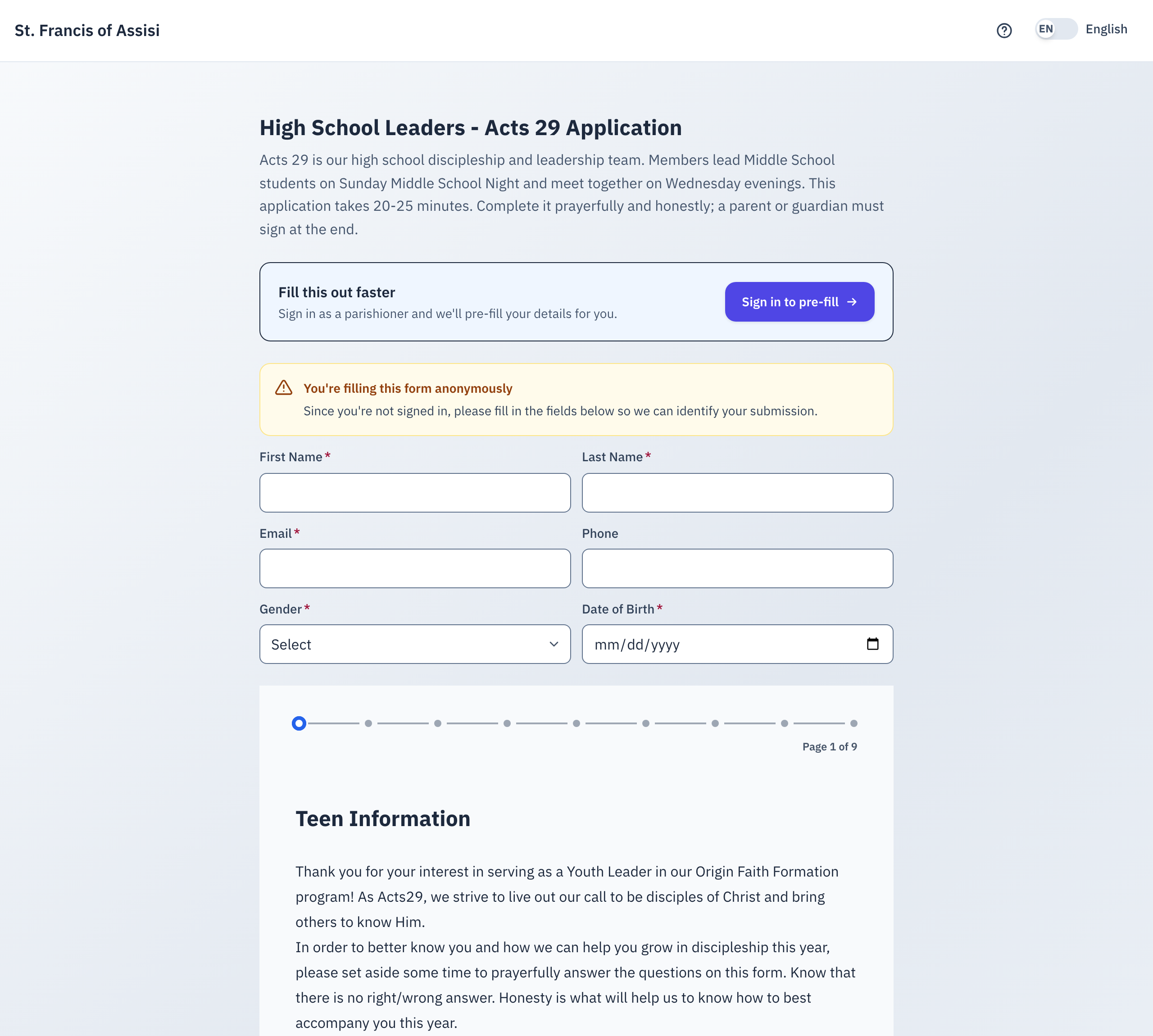
- Fill in the yellow box: First Name, Last Name, Email, Phone, Gender, Date of Birth.
- Read the welcome note and the list of expectations on page 1.
- Choose your Grade.
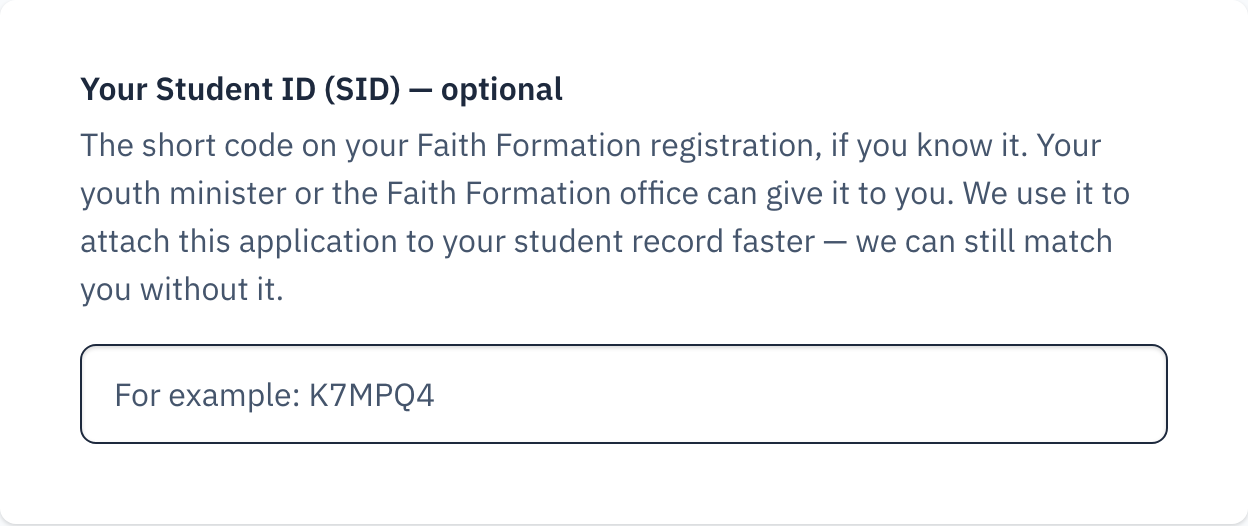
- Fill in your Student ID (SID) if you know it. Leave it empty if you do not.
- Select Next.
The Student ID is a short code on your family's Faith Formation registration confirmation. Give it if you know it, and the parish attaches your application to your student record straight away. Leave it empty and the parish finds you by the email address or the phone number you typed instead.
Never guess a Student ID. A wrong one is worse than none, because it points your application at another student.
3. Page 2 — your parent or guardian
Page 2 asks for your parent's or guardian's name, phone, and email address. All three are required. The parish writes to that email address about your small group, so check it before you move on.
If the page reloads while you type
The form can reload its text while you answer, for example when the Spanish text arrives late. The form keeps your answers and stays on the same page. Do not type your answers again.
4. Pages 3 to 7 — discernment
These five pages are the heart of the application.
| Page | What it asks |
|---|---|
| Discipleship | Your desire to follow Jesus and the Church, in eight statements. |
| Habits | Your habits of prayer, Confession, Mass, and reading Scripture, in eleven statements. |
| Virtues | Three short grids — chastity, sobriety, and excellence — two statements each. |
| Mission | How you see your part in the mission of the parish, in twenty statements, then your goals as a leader. |
| Sacraments | Which Sacraments you have received, and — if you have not received one — whether you want to, and how far along you are. |
Each rating question is a list of statements. Every statement takes one of four answers: Strongly Disagree, Disagree, Agree, Strongly Agree.
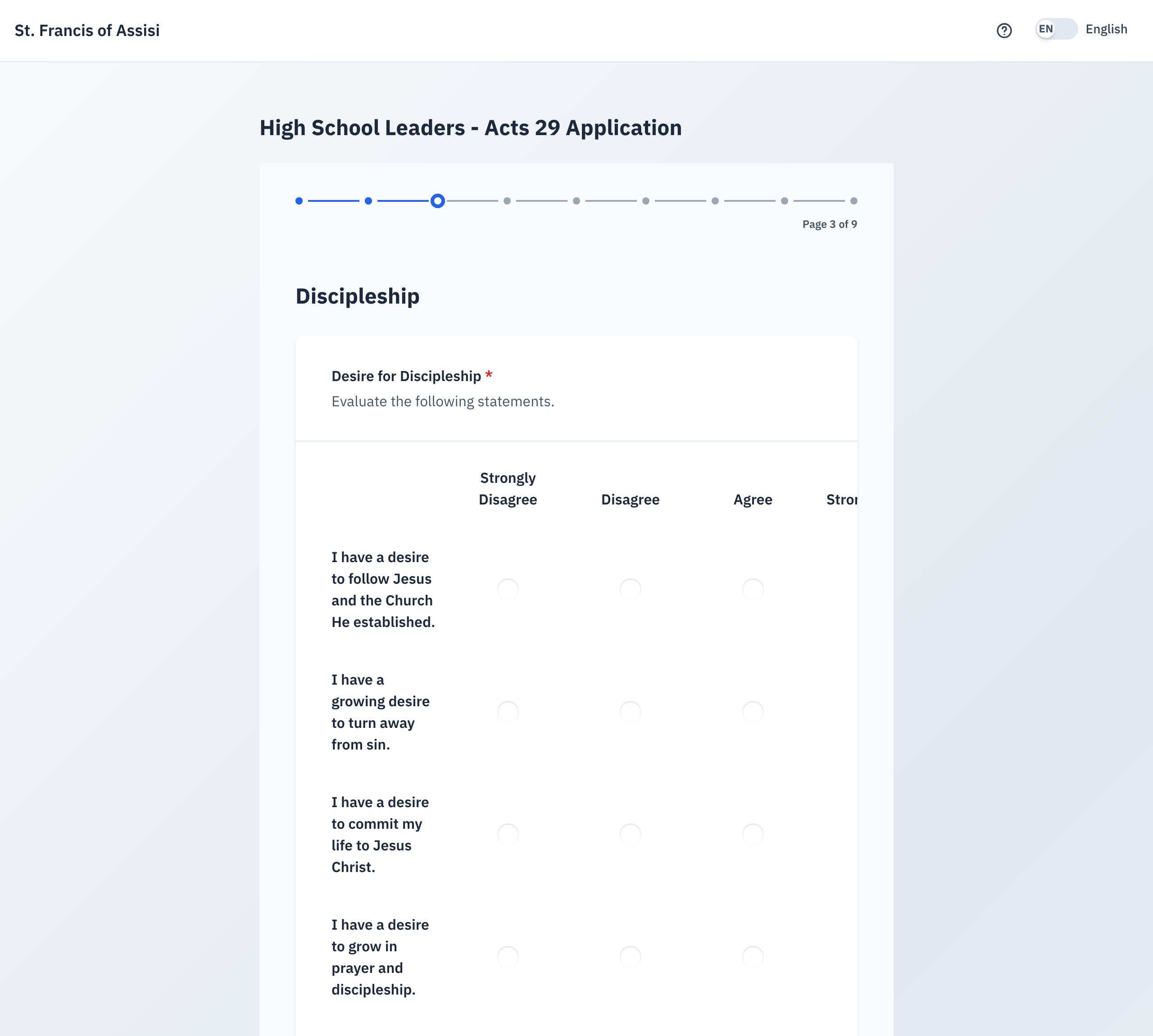
Two questions on these pages are written answers, and both are required:
- How you have encountered the Lord, on the Discipleship page. If you do not think you have, say that instead. That is an honest answer and it is welcome.
- Your goals as a leader for this parish, on the Mission page.
5. Page 8 — the four commitments
Page 8 asks four direct questions about what Acts 29 asks of you: daily prayer, a Sacramental life, Middle School Youth Night on Sunday, and the Acts 29 meeting on Wednesday evenings, 5:30 to 7:00 PM.
Each one takes Yes, I'm not sure, or Occasionally.
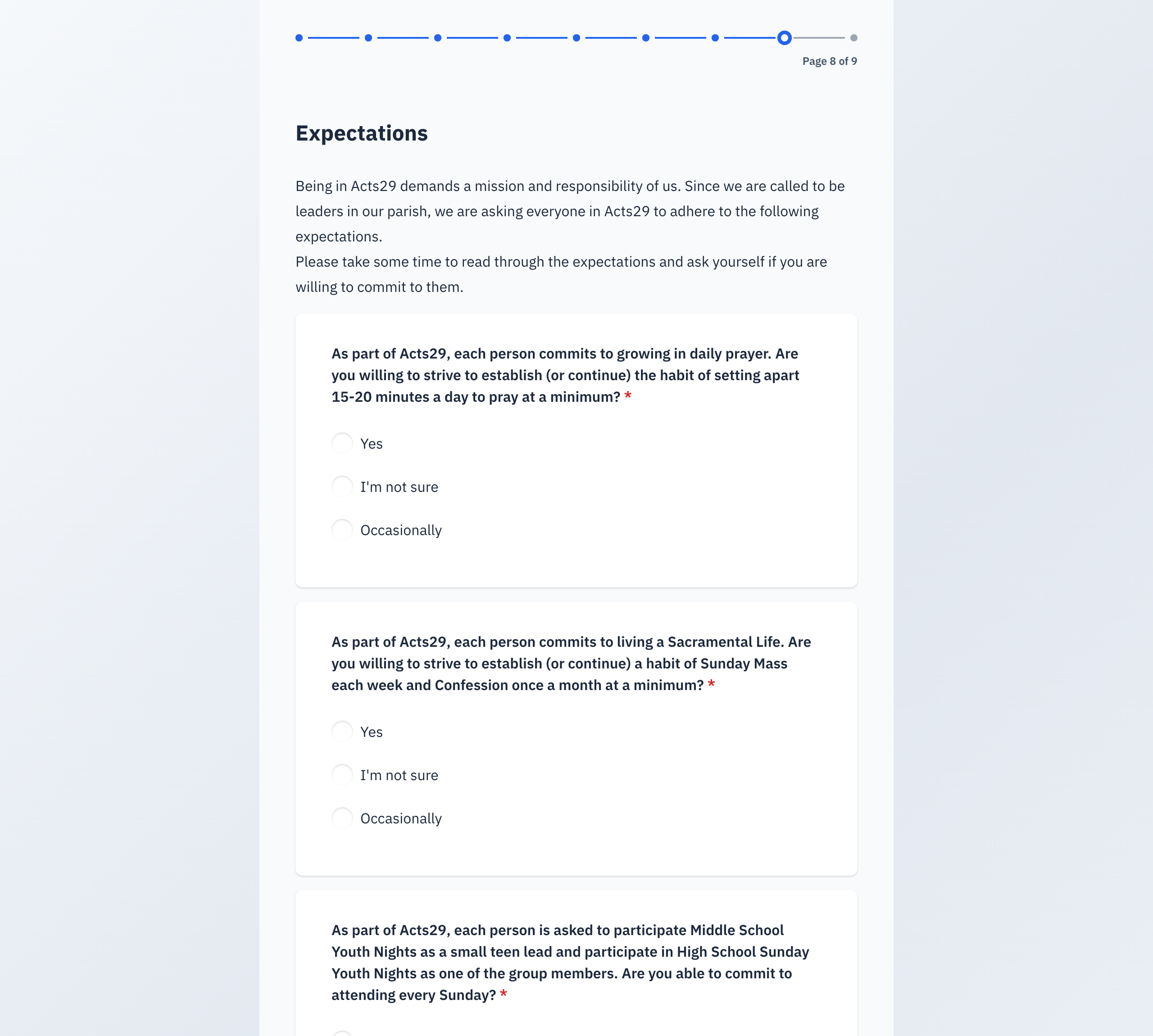
Answer these the way things actually are. If you cannot serve on Sunday nights, say so — the page opens a box for you to explain why, and your youth minister reads it. An honest "I'm not sure" does not end your application.
6. Page 9 — your parent signs
The last page holds the two agreements and your parent's signature.
- Read the two agreements with your parent or guardian: Commitment to Serve and Code of Conduct.
- Your parent or guardian types their name in Parent Signature, at the top of the page. The typed name is their signature.
- Your parent or guardian checks the box under each agreement.
- Select Accept and Join Acts 29.
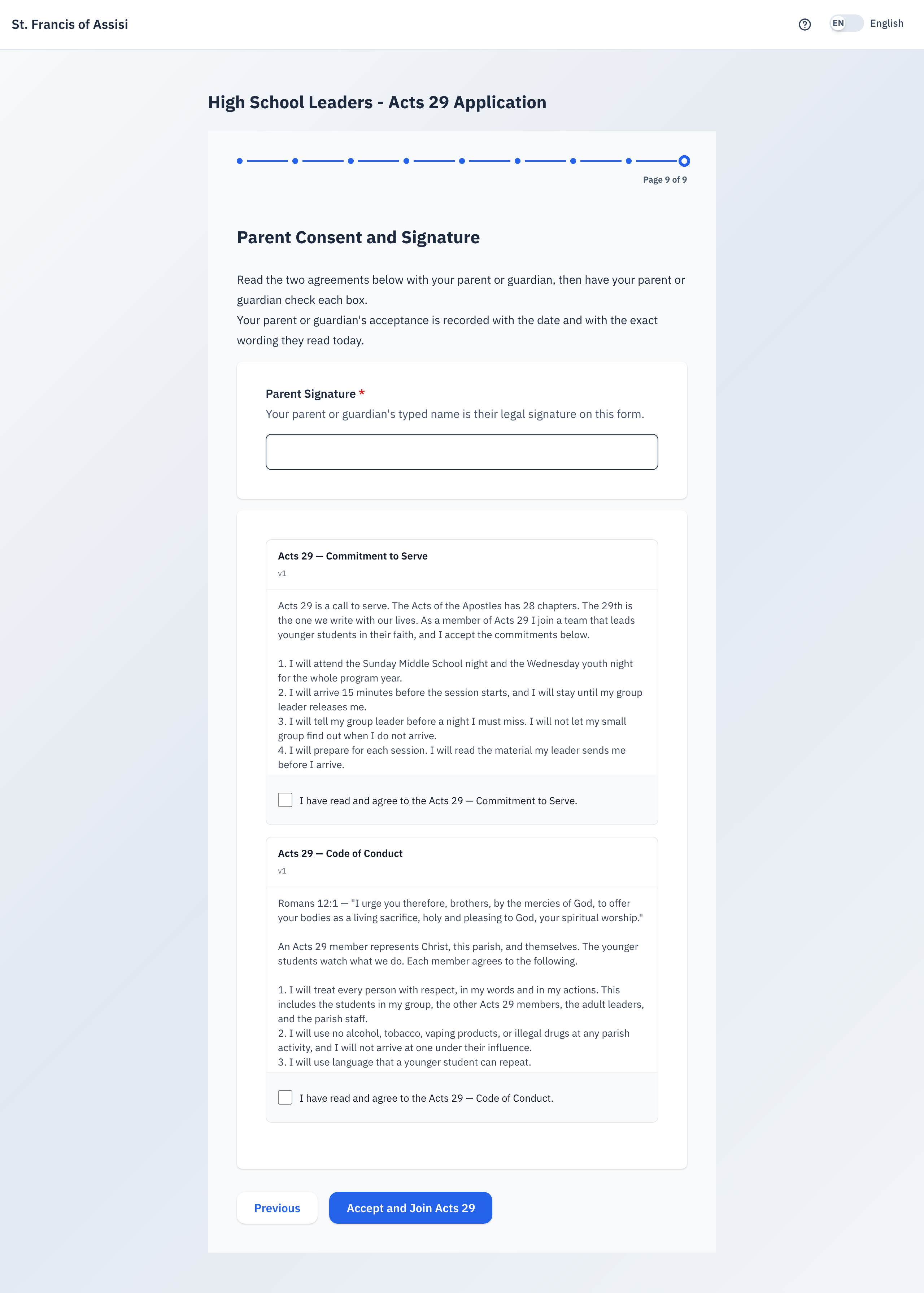
Selecting Accept and Join Acts 29 with a box unchecked does not submit the application. The page asks you to acknowledge every agreement, and every answer stays on screen — nothing is lost. Check every box, then select the button again. Read each agreement with your parent or guardian before you check it. Their acceptance is recorded with today's date and with the exact wording they read today.
7. What happens next
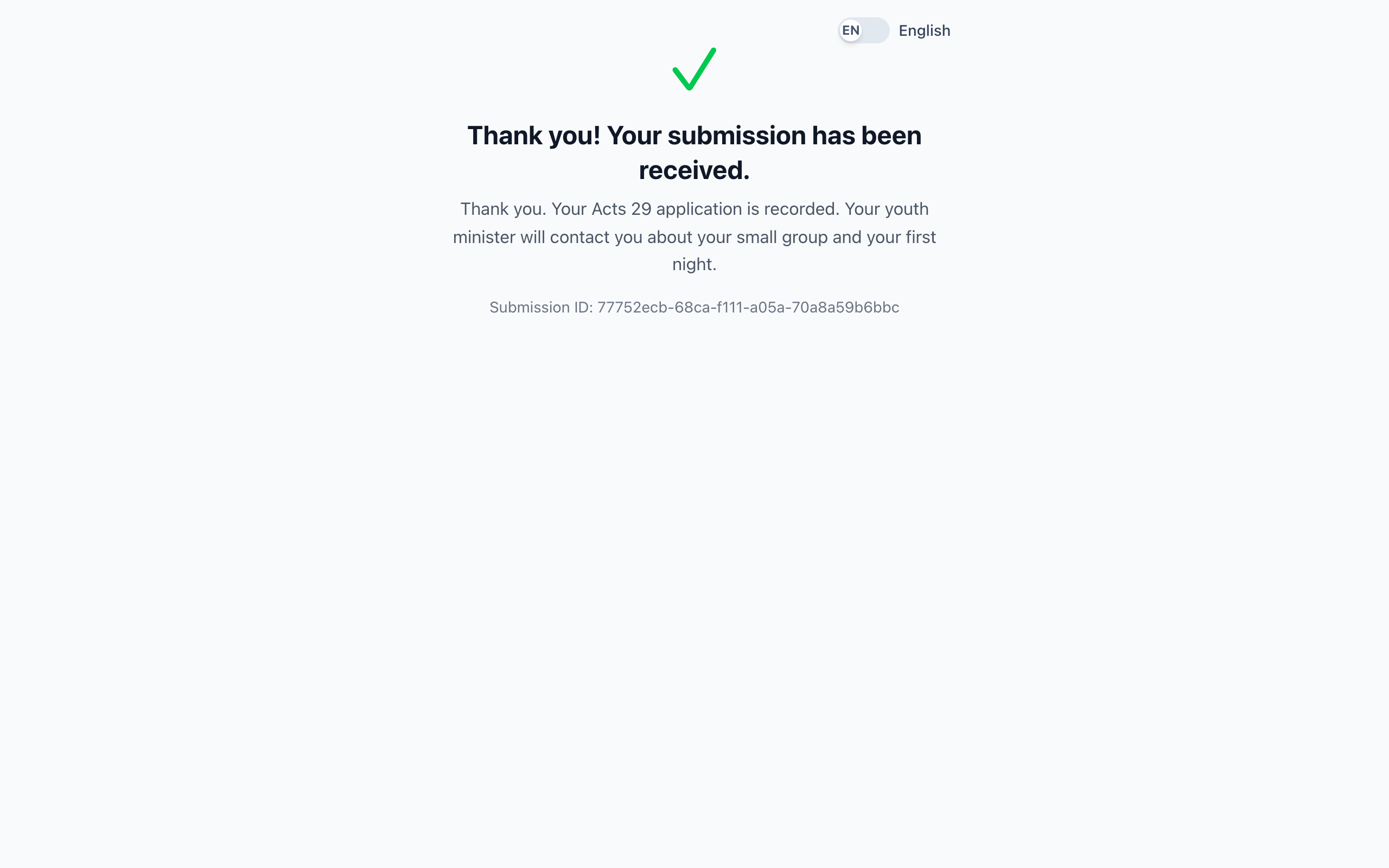
- You see a Thank you message. Your application is recorded.
- You get a confirmation email that says the parish has your application.
- Your youth minister reads the application and makes a decision.
- Your youth minister contacts you about your small group and your first night.
The email confirms that the parish received your application. It does not list what you wrote. Several questions ask about prayer, the Sacraments, chastity and sobriety, and those answers are for your youth minister — not for an inbox that a brother, a sister or anyone else at home might open.
Keep your own copy before you submit if you want one.
Select the language toggle in the top right corner of the form to switch between English and Spanish at any time, including partway through.
8. Quick reference card
The whole thing, in six lines
- Go to stfoa.link/acts29. No sign-in needed.
- Set aside 20 to 25 minutes and sit down with a parent or guardian.
- Fill in the yellow box at the top: name, email, phone, gender, date of birth.
- Answer nine pages honestly. The Student ID is optional — never guess one.
- Your parent checks the two agreements and types their name.
- Select Accept and Join Acts 29. Your youth minister contacts you.
If something looks wrong
- You do not know your Student ID — leave it empty. Do not guess.
- You cannot finish in one sitting — start again later. Nothing is kept half-finished.
- The page will not let you continue — read the red line under the grid. It says which statements are still blank. Every line in an agree/disagree grid needs an answer.
- You pressed Submit and got a message about your entries — the red box now lists each answer that needs fixing, by name. Work down that list, then submit again. Nothing you have typed is lost.
- You selected Accept and Join Acts 29 and nothing happened — one of the two agreement boxes is unchecked. The page says so and keeps every answer; check both boxes and select the button again.
- You submitted, but never heard from your youth minister — contact the Faith Formation office. Give them your name and your parent's email address.
Thank you for offering to lead. The Middle School students in your small group will remember the person who showed up for them.