Sending Your Child's First Communion or Reconciliation Certificate
St. Francis of Assisi Catholic Church · Faith FormationHow to check whether the parish has your child's First Communion or First Reconciliation certificate on file, and how to send a copy.
Any parent or guardian of a child registered in Faith Formation. You do not need to log in. If the parish emailed you a link, follow it — it already knows your child and sacrament. Otherwise, use your child's Student ID and last name.
A certificate on file confirms a sacrament your family told us was already received. Send it as soon as you can so the parish record matches what actually happened.
What you will do, in one sentence
Follow the link in the parish email, or look up your child by Student ID and last name, then upload a photo, scan, or PDF of the certificate.
Last verified against the staging system on 2026-10-20. Screens shown are the staging system (an isolated copy of production). The student shown is an invented QA fixture, not a real family. Prepared 20 October 2026.
1. Where to go
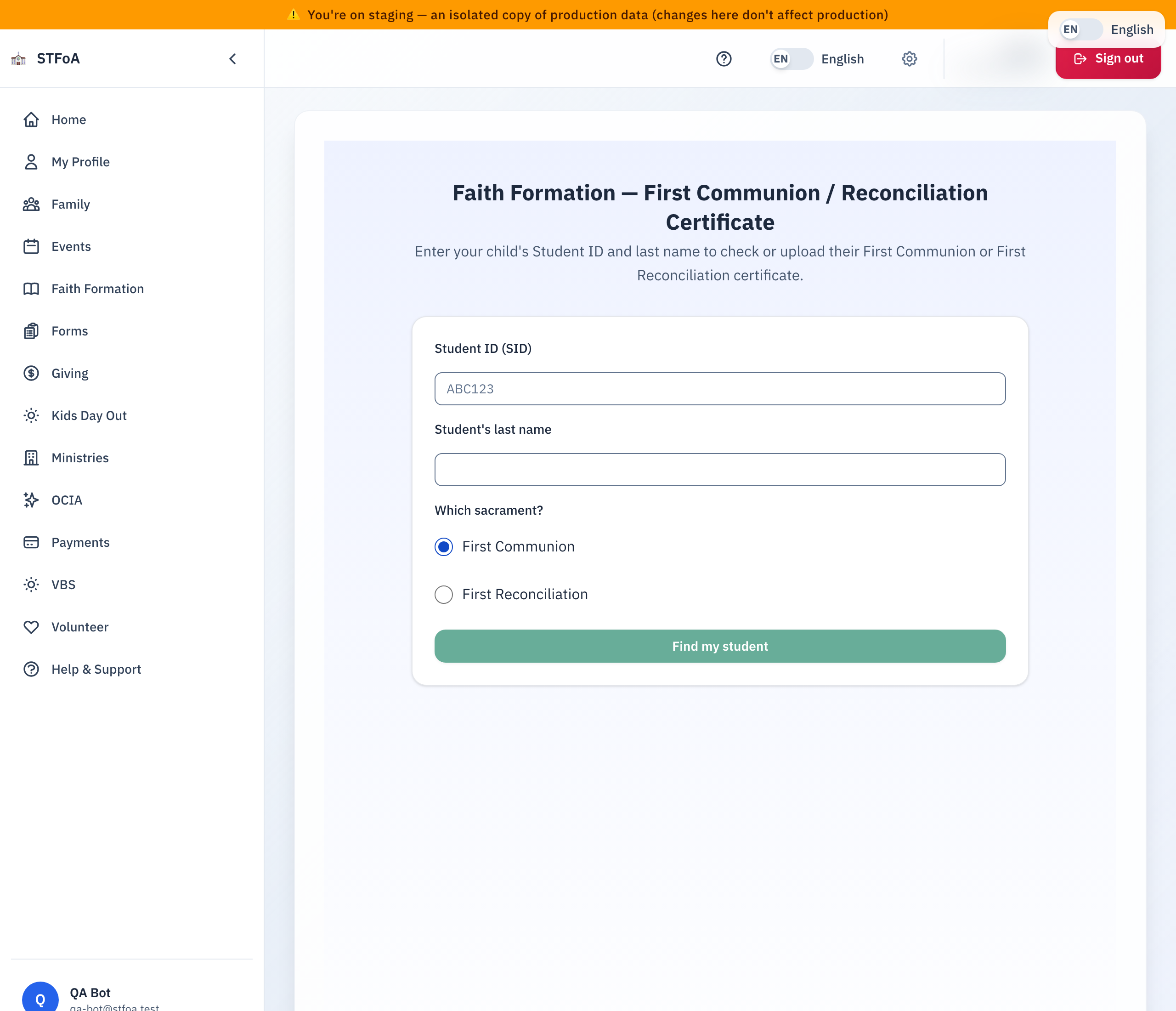
If the parish emailed you asking for this certificate, select the link in that email. It opens this page already knowing your child and which sacrament to ask about — you can skip straight to section 4.
Otherwise, go to <your parish app address>/faith-formation/sacrament-cert in any
web browser, on a computer or a phone. You do not need to log in.
The link in the parish email is good for one upload, for one week. If it has already been used, or more than a week has passed, use the Student ID and last name form instead — it always works.
2. Looking up your child
You need your child's Student ID (SID) and their last name. The Student ID
is on their registration confirmation or any letter from the Faith Formation
office — a short code such as ABC123.
- Type the Student ID into the first box. It is not case-sensitive.
- Type your child's last name into the second box.
- Choose First Communion or First Reconciliation — whichever certificate you are sending.
- Select Find my student.
Check both boxes again, especially the last name — both must match exactly. If it still cannot find your child, contact your parish's Faith Formation office rather than trying many combinations.
3. Reading the status
Once the parish finds your child, a status badge shows one of four states.
| Status | What it means |
|---|---|
| Not on file | The parish has never received this certificate. Upload one. |
| Under review | Staff are checking a certificate the parish already received. No action needed. |
| Needs a new copy | The parish could not accept the certificate it received. Upload a new one. |
| On file | Staff checked and accepted the certificate. Nothing more is needed. |
If the status is On file, there is no upload button and nothing left to do.
4. Uploading the certificate
An upload button appears below the status unless the status is On file.
- Type the date the sacrament was received and the parish where it happened.
- Select Upload certificate (or Upload a new certificate if one is already under review).
- Choose a photo, scan, or PDF of the certificate from your phone or computer. The largest file the page accepts is 10 MB. A larger file shows "That file is too large. Maximum size is 10 MB."
- Wait for the confirmation message.
Fit the entire document in the photo, right side up if possible, in good light and in focus. A cut-off corner or a blurred date is the most common reason a certificate cannot be accepted.
5. After you upload
A message appears saying "Thank you — your certificate was received and is under review," and the status changes to Under review.
A staff member checks the certificate against the date and parish you typed. You do not need to do anything else unless the office contacts you asking for a clearer copy or a correction.
6. Quick reference card
The whole job, in four steps
- Follow the parish email link, or go to
<your parish app address>/faith-formation/sacrament-cert. - If you did not use the email link: type your child's Student ID and last name, pick the sacrament, and select Find my student.
- Type the date and parish, then select Upload certificate and choose a clear photo, scan, or PDF of the whole document.
- Wait for the confirmation message. A staff member takes it from there.
When to contact the office instead
- The lookup cannot find your Student ID.
- Your child's status says "Needs a new copy" more than once.
- The email link says it has expired or was already used, and you have no other way to reach this page.
Your parish's Faith Formation office
Thank you for sending this in. It is one of the last steps before your child's sacrament record is complete.