Registering for a Conference or Retreat
St. Francis of Assisi Catholic Church · ConferencesHow to find a conference or retreat, register, pay the deposit, and manage your registration.
You are a signed-in parishioner. You want to join a conference, retreat, camp, workshop, or mission trip that your parish offers.
One registration page tells the parish who will come, what you owe, and which waivers you accepted. You can come back at any time to pay a balance or cancel.
What you will do, in one sentence
Open the list, choose a conference, select Register, and pay the deposit if the page asks for one.
Last verified against the staging system on 2026-10-20. Prepared 20 October 2026.
1. Find a conference
- Sign in to the parish app.
- Open Conferences & Retreats from the menu, or go to
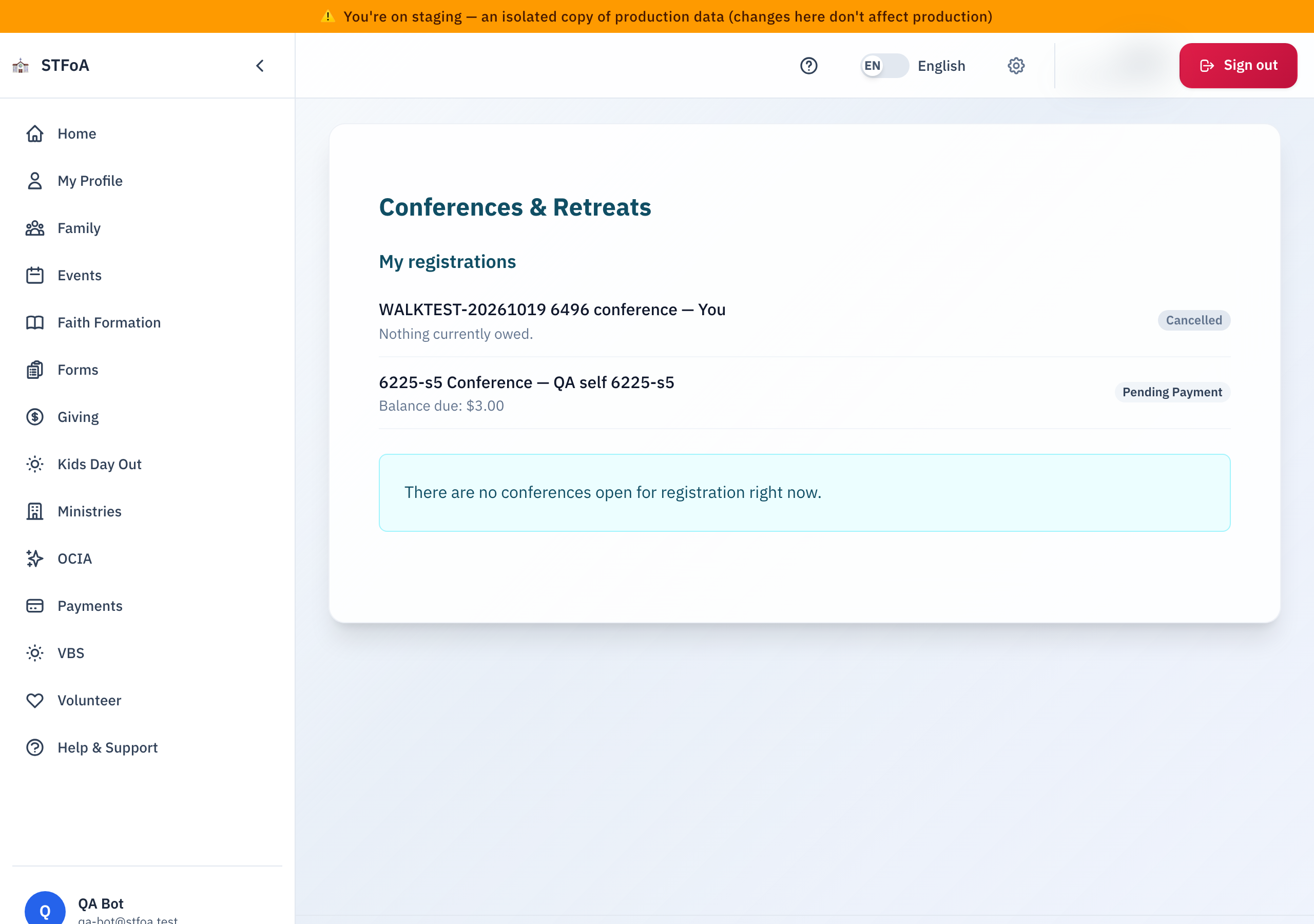
/conferences. - Read the list. Each line shows the name of the conference and where it takes place.
If the list is empty, the page says: "There are no conferences open for registration right now." Come back later.
Retreats, camps, mission trips, and workshops all show in this one list.
2. Register
- Select the name of a conference.
- Read the Location, the Dates, and the description.
- Select Register.
- If the conference asks for waivers or questions, answer them. Select I accept this waiver for each waiver. Type your full name as your signature.
- Select Complete registration.
The page shows "You are registered." You register as the person who is signed in.
If the conference asks for a deposit
The page shows "A deposit of $X is due to secure your spot." Select Pay deposit now and pay. Your spot is not safe until you pay.
If the conference is full
The page shows your place on the waitlist. You owe nothing unless a spot opens for you.
3. Check or pay your registration later
The top of the Conferences page shows My registrations. Each line shows:
- the name of the conference
- a status: PendingPayment, Confirmed, Waitlisted, Cancelled, CheckedIn, or Completed
- the balance due, or "Nothing currently owed."
- Find the line for your conference.
- Select Pay and the name of the payment step. A payment link opens.
4. Ask for a scholarship
- Find your registration under My registrations.
- Select Request scholarship.
- Confirm the request. Parish staff review it.
The line shows "Scholarship request pending review." until staff decide. The button shows only while you owe a balance.
5. Cancel
- Find your registration under My registrations.
- Select Cancel.
- Confirm. You cannot undo this step.
You can cancel while the status is PendingPayment, Confirmed, or Waitlisted.
6. What can go wrong
| What you see | What to do |
|---|---|
| "Registration is not open for this conference." | Registration has not started. Come back on the opening date. |
| "Registration for this conference is closed." | Ask the parish office if a spot is still free. |
| "You are already registered for this conference." | Look under My registrations. Do not register twice. |
| "Registration could not be completed. Please try again." | Wait a minute and try again. Then ask the parish office. |
| "This conference could not be found." | The link is old. Go back to the list. |
| "Your registrations could not be loaded right now." | Refresh the page. |
Parish office — ask about a deposit, a refund, or a waiver.