Enrolling a Child in Kids Day Out
St. Francis of Assisi Catholic Church · Kids Day OutHow to start the Kids Day Out enrollment form and what to have ready before you begin.
You are a parishioner ready to enroll a child in Kids Day Out.
Kids Day Out cares for young children, so the form collects health information, emergency contacts, and authorized pickups before a child can attend — the same information a parish would ask for on paper, now in one guided form.
What you will do, in one sentence
Open Enroll Now, work through the eight steps, and review everything before you pay.
Last verified against the staging system on 2026-10-20. Screens shown are the staging system (an isolated copy of production). This capture shows only the blank Welcome step — no child or family data was entered, so no fixture was needed. Prepared 20 October 2026.
1. Where to go
- Sign in to the parish portal.
- Click Kids Day Out in the sidebar, then Enroll Now — or open the form directly at
/kdo/register.
2. Reading the Welcome step
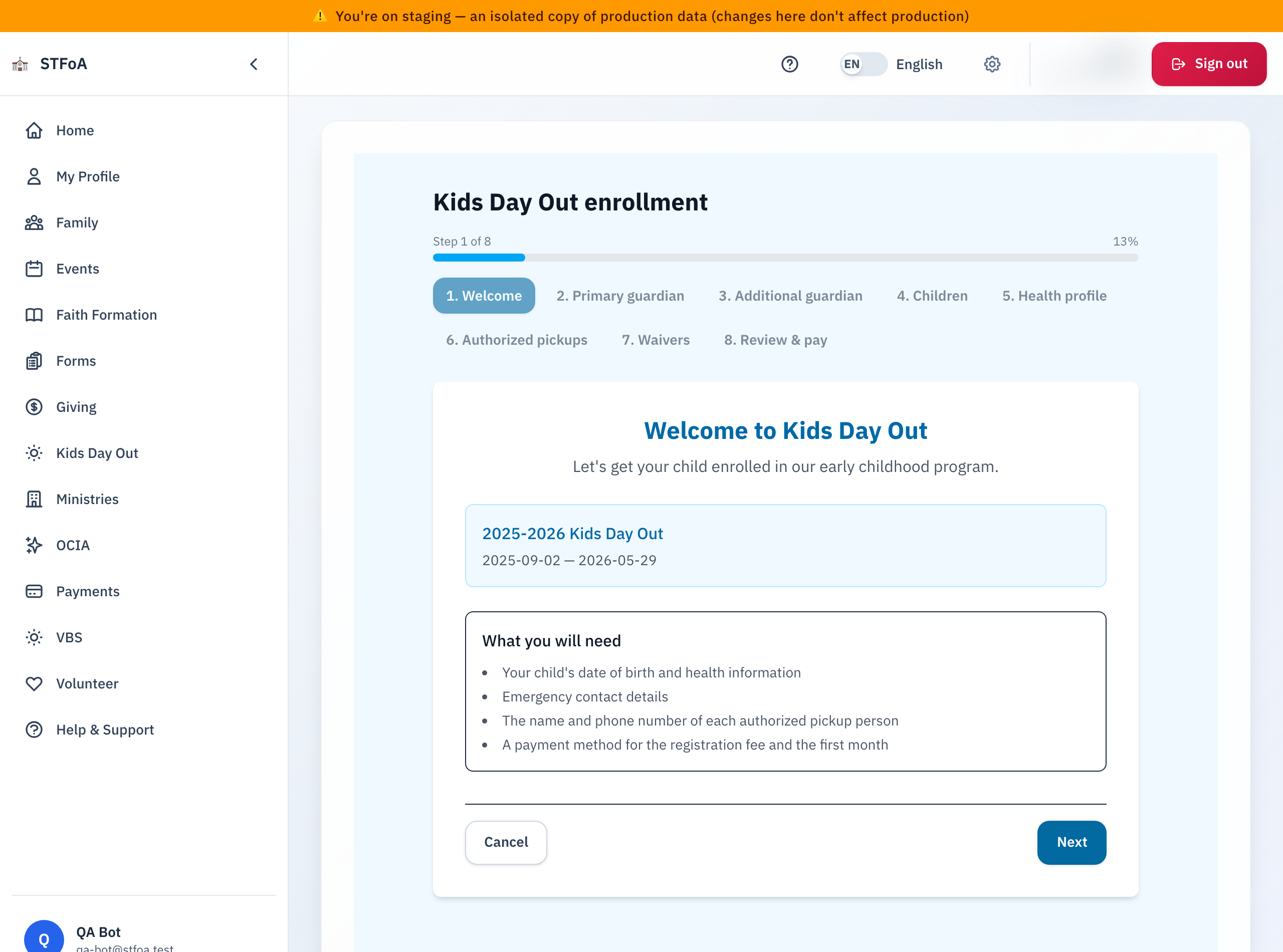
The progress bar at the top names all eight steps:
- Welcome — confirms the open program year and what to have ready.
- Primary guardian — your name, email, and phone.
- Additional guardian — a second guardian, if there is one.
- Children — each child's name, date of birth, and schedule.
- Health profile — allergies, medications, and other health notes per child.
- Authorized pickups — who may pick up each child besides the guardians.
- Waivers — the waivers the program requires.
- Review & pay — a final check, then payment.
Each child's date of birth and health information, emergency contact details, the name and phone number of every authorized pickup person, and a payment method for the registration fee and the first month.
3. Working through the form
- Click Next to move to the next step. Click a step's own tab to jump back to it.
- Fill in every required field — the form will not let you continue past a step with a missing required field.
- On Review & pay, check every child and guardian before you submit payment.
Once you submit payment on the last step, the enrollment is real — your child is enrolled or waitlisted, and the program records are created. Review carefully before you pay.
4. Quick reference card
The whole thing, in three lines
- Kids Day Out → Enroll Now, or
/kdo/register, opens the eight-step form. - Have each child's birth date, health notes, and pickup list ready before you start.
- Review & pay is the last step — submitting it enrolls or waitlists your child.
When to stop and ask
- The form will not let you past a step, and you believe every field is correct.
- Payment fails on the last step.
Parish office — contact the front office for help.
Thank you for enrolling your child in Kids Day Out.