Checking Your OCIA Journey
St. Francis of Assisi Catholic Church · OCIAHow to read your OCIA journey dashboard once your intake is submitted.
You are a parishioner who has submitted an OCIA intake.
Once your intake is submitted, your journey dashboard is the one place to track where you are in the OCIA process without calling the office.
What you will do, in one sentence
Open My OCIA Journey to see your path, your intake, documentation, and sponsor status, and your communication preferences.
Last verified against the staging system on 2026-10-20. Screens shown are the staging system (an isolated copy of production). The candidate shown is the standing QA fixture ([guide fixture Prepared 20 October 2026.
1. Where to go
- Sign in to the parish portal.
- Click OCIA in the sidebar, then My OCIA Journey — or open it directly at
/ocia/dashboard.
If you have not submitted an intake yet, this page instead offers Submit your intake — see the Starting Your Own OCIA Registration guide.
2. Reading your journey dashboard
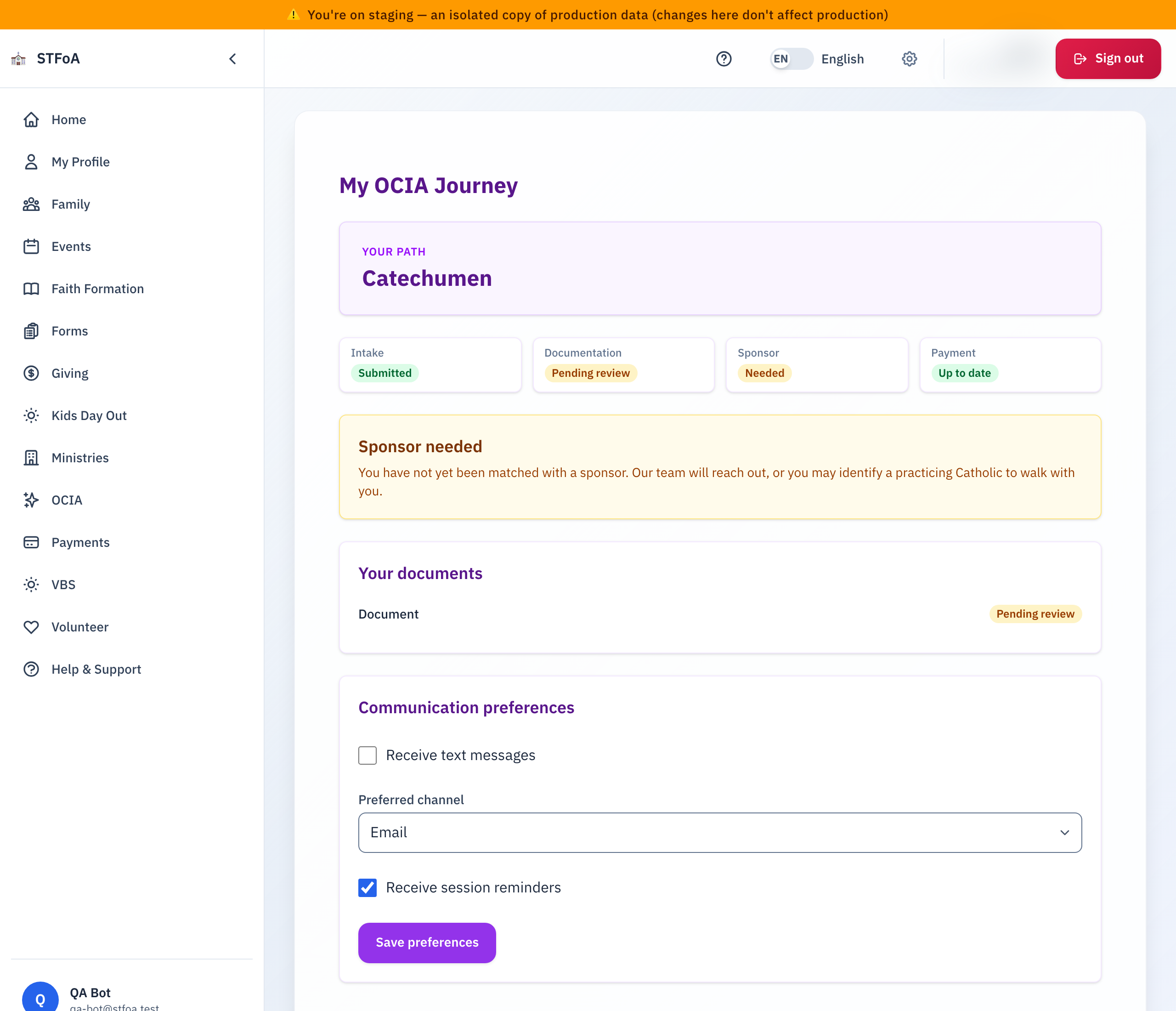
Your Path names your track — Catechumen for someone not yet baptized.
Four tiles summarize where you stand:
| Tile | What it tells you |
|---|---|
| Intake | Submitted once your registration is in. |
| Documentation | Pending review until the parish verifies your uploaded document. |
| Sponsor | Needed until a sponsor is matched to you. |
| Payment | Up to date, or what you owe. |
Below the tiles, a notice explains anything still outstanding — for example, that no sponsor is matched yet and the parish will reach out. Your documents lists each uploaded document and its review status. Communication preferences lets you choose text messages, your preferred channel, and whether you receive session reminders.
3. Quick reference card
The whole thing, in two lines
- OCIA → My OCIA Journey, or
/ocia/dashboard, shows your path, your four status tiles, your documents, and your communication preferences. - A yellow notice names anything still outstanding — read it first.
When to stop and ask
- A tile shows a status that does not match what you were told.
- Documentation stays Pending review far longer than expected.
Parish office — contact the parish office for help.
Thank you for walking this journey with your parish.