Volunteering with Faith Formation
St. Francis of Assisi Catholic Church · Faith FormationHow to apply to serve with the Kids or Youth program, and what happens after you do.
Any adult parishioner who wants to serve with Faith Formation. You need a parish portal account, because the form fills in what the parish already knows about you.
The program runs on adults who give their evenings to it. The steps below exist so you know where your application stands at every point, and so nobody is left wondering.
What you will do, in one sentence
Sign in, fill out the two-page application for Kids or Youth, then check your status page for the parish's two follow-up messages.
Last verified against the staging system on 2026-10-17. Screens shown are the staging system (an isolated copy of production), signed in as an invented training account — "QA FFParentBot" for the status page, "QA ModuleAdminBot" for the blank application (see Section 2's note). Prepared 17 October 2026.
1. Before you begin
There are two links, one for each program. A person may hold one Kids application and one Youth application in the same program year.
| Program | Link |
|---|---|
| Kids (K–5) | <your parish app address>/faith-formation/volunteer?program=kids |
| Youth (6–12) | <your parish app address>/faith-formation/volunteer?program=youth |
Sign in with your parish portal account first. If your household has more than one adult, the form does not guess who is applying — the "who is volunteering?" chooser at the top starts empty, and the rest of the page stays blank until you pick a name from it. You may only apply for somebody in your own family. A household with only one adult on file skips the chooser and fills in that adult automatically.
2. Filling in the form
The form has two pages.
- About you. Your details, the Volunteer Opportunity you would like, the Core Team Gatherings you can attend, when you are free, an emergency contact, and a shirt size.
- Agreements. The parish waivers and your signature.
Continue to Agreements stays greyed out until every question on page one is answered, so you cannot reach the signature with a half-finished form.
The Opportunity you pick is what the office staffs from, and it is the label printed on your nametag. If none of them fits, pick the closest and explain in Availability notes.
For the Kids (K-5) form, your answers to "when you are free" and "in which language would you prefer to minister" decide which leader messages reach you — Sunday, Wednesday, or both, in English, Spanish, or both. Pick the answer that matches how you actually plan to serve.
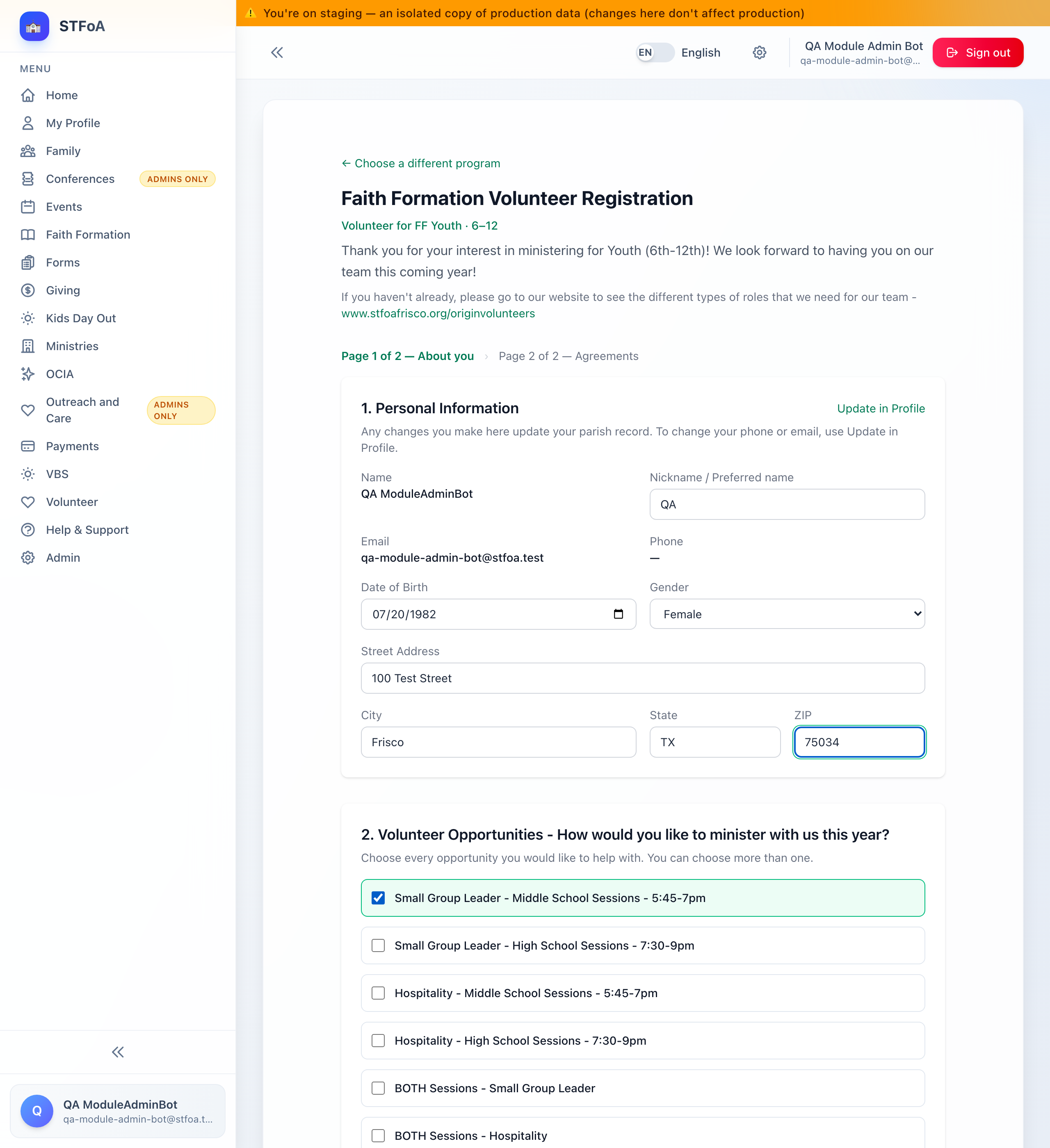
This shows the Youth application for "QA ModuleAdminBot," not "QA FFParentBot" from the rest of this guide. FFParentBot already applied for both programs this year, so its own form shows the status page every time, not a blank one — the same reason Section 3's screenshot uses it instead.
3. What happens next
You receive two messages from the parish, and no others.
| When | What arrives |
|---|---|
| As soon as you submit | A welcome message with the onboarding guide — what to pray about, the Safe Environment steps, the dates to save, and the session format. |
| When the office assigns you to a group | "You are approved to volunteer with Faith Formation," with the name of your group and your next steps. |
Both come by email, and by text message if the parish holds your mobile number. Both are written in English first and Spanish after, in the same message.
Your status page says On the team as soon as you submit. The parish no longer holds applications for approval. The second message waits for one more step: the office must assign you to a group, and the message gives you the name of that group. A gap of some days is normal. If weeks pass and you have heard nothing, write to the Faith Formation office and ask.
4. Safe Environment
Every adult who serves with children must hold current Safe Environment clearance from the Diocese of Dallas. The parish checks this for every volunteer before the first session.
You can be placed on a team before your clearance is on file. Your placement message says so: it is confirmed pending Safe Environment verification. If something is missing, the parish's Safe Environment Coordinator contacts you directly.
The form does not ask about your clearance and does not need you to attest to it. It shows you where you stand: your clearance date if the parish holds a current one, or a note pointing you at your parish's safe-environment page if it does not. Either way you can apply today.
Clearance expires. If yours lapses while you are serving, the Coordinator contacts you — but the fastest route is to renew before it runs out.
5. Checking where you stand
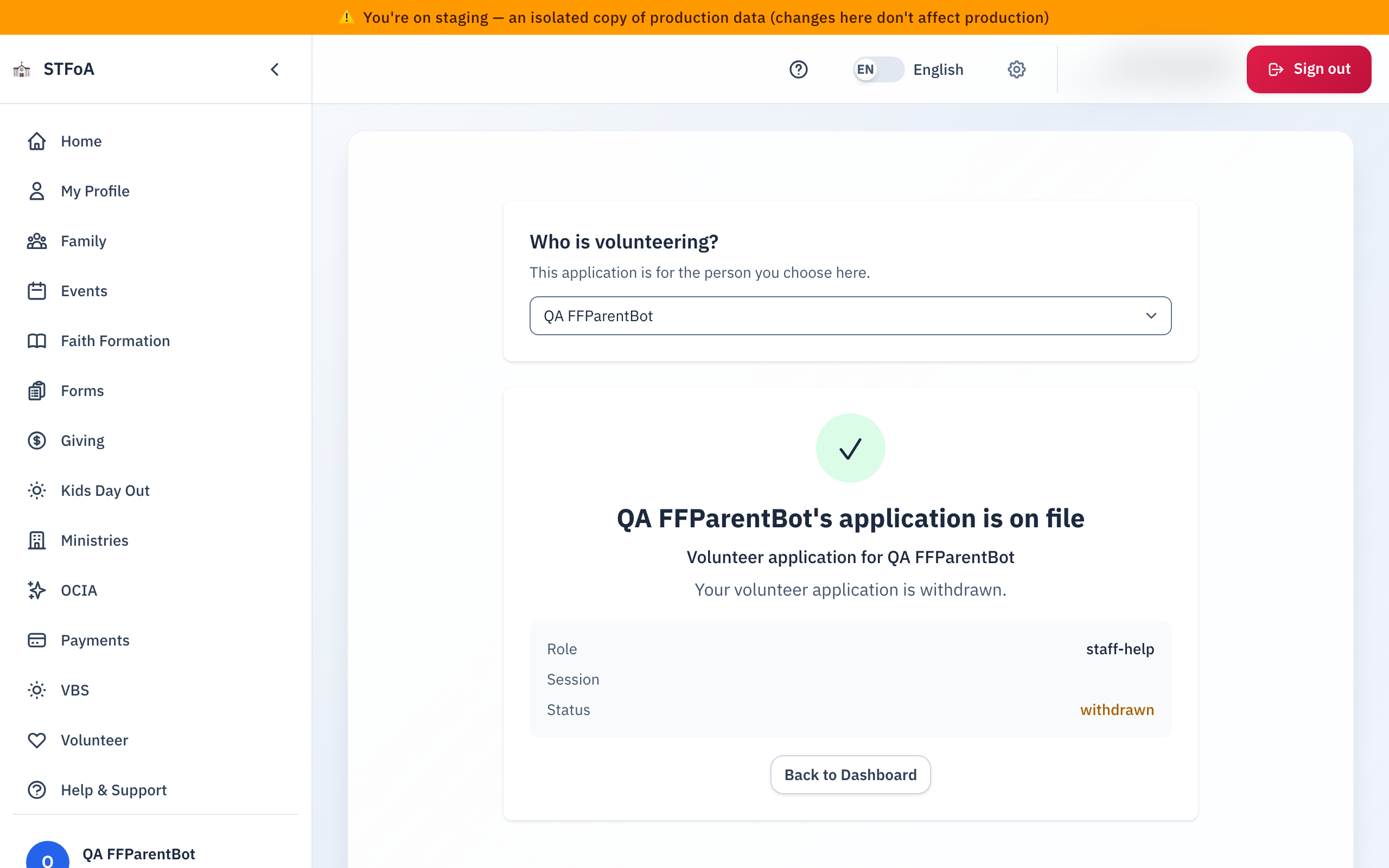
Sign in and open the volunteer page for your program again. It shows the state of your application.
| What it says | What it means |
|---|---|
| Awaiting review | An admin sent your application back for a second look. You are not on the team while it says this. |
| On the team | You are placed. The parish does this when you apply. The second message comes later, when the office assigns you to a group. |
| Not placed | The parish could not place you this program year. Contact the office — it is often about numbers, not about you. |
| Withdrew | The application was pulled back — by you, or by staff on your behalf. Contact the office if this is unexpected. |
The second message goes out when the office assigns you to a group, so a wait is normal. Check your spam folder first, then write to the Faith Formation office. The parish can send it again.
Questions
Write to the Faith Formation office. Replying to either of the two messages reaches a monitored parish mailbox, not a no-reply address.
6. Quick reference card
The whole job, in three steps
- Sign in and open your program's volunteer link.
- Fill in About You, then Agreements, and submit.
- Watch for the welcome message now, and for the placement message when the office assigns you to a group. Both come by email and text.
When to contact the office
- Your application says Awaiting review for more than a few days.
- You are on the team but never received the placement message.
- Your Safe Environment clearance is about to lapse.
Thank you for saying yes to serve Faith Formation.