Finding Your Way Around After You Sign In
St. Francis of Assisi Catholic Church · Getting StartedWhat the Welcome page shows after you sign in, and how to open any feature from it.
You just signed in to the parish app — as a parishioner, a guest account, or any other signed-in account.
The app serves many kinds of accounts — full parish members, guests who signed up for one event, and staff. The Welcome page shows only what your account can use, so you never see a tile for a feature you cannot open.
What you will do, in one sentence
Find the tile for what you want to do, and select it — that tile takes you straight there.
Last verified against the staging system on 2026-10-20. Screens shown are the staging system (an isolated copy of production). The account shown is an invented QA test fixture, not a real parishioner. Prepared 20 October 2026.
1. What you see after you sign in
Sign in, and the parish app opens the Welcome page. This is your home screen. Every time you sign in again, you land here first.
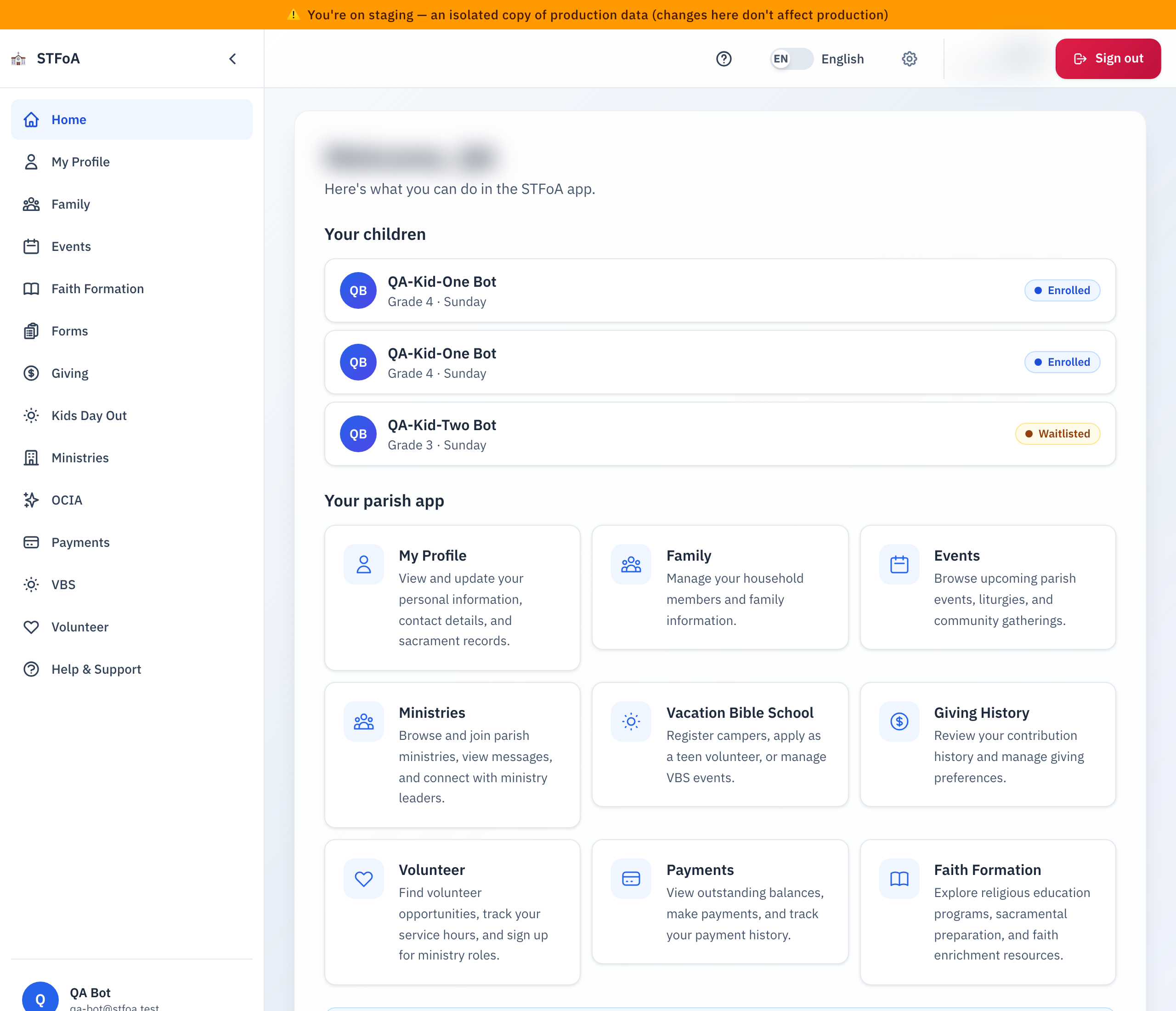
At the top, the page greets you by your first name.
If your family has a Faith Formation registration, two cards can come next:
- Faith Formation balance due shows only when your family owes money. It shows the amount, the next payment date, and how many plan payments are made. Select Pay now to open the Faith Formation payments page, where you pay, pay off a plan, or update the card on a plan.
- Today's pickup code shows the code that releases your child at pickup. The code is hidden. Select Show code to see it, and Hide code to hide it again.
If your household has children, the Your children list comes next. It shows every child in your household, even a child who is in no program. A pill under the child's name names each program the child is in and the year, for example Faith Formation 2026–27 or VBS 2027. Select a pill to open that program. A child in no program has no pill.
Below the cards, under Your parish app, the page shows a tile for each feature your account can use. Every tile has an icon, a name, and one line about what it opens.
| Tile | What it opens |
|---|---|
| My Profile | Your personal information, contact details, and sacrament records. |
| Family | Your household members and family information. |
| Events | Upcoming parish events, liturgies, and community gatherings. |
| Ministries | Parish ministries you can browse or join, and ministry messages. |
| Vacation Bible School | VBS camper registration, the teen volunteer application, and VBS events. |
| Giving History | Your contribution history and your giving preferences. |
| Volunteer | Volunteer opportunities, your service hours, and ministry role sign-ups. |
| Payments | Outstanding balances, payments, and your payment history. |
| Faith Formation | Religious education programs, sacramental preparation, and faith enrichment resources. |
If your device can use a passkey and you have none, a banner called Sign in faster with a passkey can show under the greeting. It does not block the page.
- Select Add a passkey and follow your device's own prompt.
- Select Not now to hide the banner for 7 days.
- Select Don't ask me again to stop the banner on this device.
The banner never shows on a device that cannot use passkeys.
Below the tiles, a note called Getting started? reminds you to use the menu to move between sections. It also suggests you start with My Profile, so your information is current.
On a phone: the bar at the bottom
On a phone, a bar at the bottom of the screen holds five buttons:
| Button | What it opens |
|---|---|
| Home | This page. |
| Three sections | The three sections you open most on this phone, for example Giving. |
| More | A list of every section you can use, and Family. |
A new person sees Giving, Volunteer and Events first. If your household has a child in Faith Formation, the bar shows Faith Formation first. The bar learns from what you open on that phone. It stores the counts on the phone only, and it does not send them to the parish. A guest account does not see Giving. Faith Formation messages stay inside Faith Formation. On a tablet or a computer, the menu on the left does the same job, and the bar does not show.
To use More, select it. A list opens. Press Escape or select the close button to shut it.
2. Opening a feature
- Find the tile for what you want to do.
- Select the tile. The icon, the title, and the description all open the same feature.
- The feature opens in place of the Welcome page.
The menu on the left opens the same features as the tiles. Use whichever is faster for you.
To come back to this page, select Home in the left menu, or Home in the bar at the bottom of a phone. Your browser's back button also works.
3. If a feature you expect is missing
Not every account sees every tile. What you see depends on your account, and on what the parish currently has switched on.
Guest accounts see fewer tiles
Guest accounts are for someone who signed up for one thing — like Vacation Bible School — without becoming a full parish account. By design, a guest account should not show the Events tile, and every other tile a guest account can use should show, in the same place.
A tile you rely on is gone
The parish can switch a whole section off for everyone, for a short time — for maintenance, or while a problem is being fixed. When a section is off, its tile simply does not show. You do not see an error message, and nothing you did caused it.
If a tile you rely on disappears and stays gone for more than a day, tell the parish office.
4. Quick reference card
The whole thing, in three lines
- Sign in, and the Welcome page shows a tile for each feature you can use.
- Select any part of a tile to open that feature.
- Select Home in the left menu, or in the bottom bar on a phone, to come back to this page.
When to stop and ask
- A tile you use every week is gone, and it has stayed gone for more than a day.
- A tile opens, but the page inside it looks wrong or will not load.
- You do not recognize the name in the greeting at the top of the page.
Parish office — ask for whoever helped set up your account.
What changes by account
- A guest account does not see Events. Every other tile works the same way.
- A tile that is switched off for the whole parish shows for no one but a parish admin.
Thank you for taking a look around. The tile you need is one selection away.