Setting Your Ministry Preferences and Swapping Shifts
St. Francis of Assisi Catholic Church · VolunteerHow a minister sets scheduling preferences and blackout dates, takes an open position, and asks one person to cover or trade a shift.
You serve in a ministry that the parish schedules for you, such as Lectors. Your ministry leader added you to that ministry. If the page says you are not in a scheduled ministry, ask your leader to add you.
The scheduler builds the quarter from what you tell it. If you list the dates you cannot serve and the most you can do each month, the scheduler does not assign what you cannot do. Your leader then spends less time on changes.
What you will do, in one sentence
Open My ministry profile to set your limits and blackout dates, take open positions from the opportunity page, and use Ask someone on My Schedule to hand off a shift.
Last verified against the staging system on 2026-10-20. Screens shown are the staging system (an isolated copy). The ministry and names shown are invented training records. Prepared 20 October 2026.
1. Set your preferences
My ministry profile holds one card for each scheduled ministry you serve.
- Open Volunteer, then select My ministry profile.
- Find the card for your ministry.
- Set Most assignments per month. Leave it blank for no limit.
- Set Send my reminder to the number of hours you want before a shift. Choose Use the ministry default to keep the ministry setting.
- Select Schedule me with my family members when possible if you want to serve with family.
- Select the services you prefer. Select Only schedule me for my preferred services to serve only at those.
- Select Save preferences. Wait for the green message Your preferences are saved.
If you select Only schedule me for my preferred services and choose no service, the page refuses to save. The scheduler would never assign you.
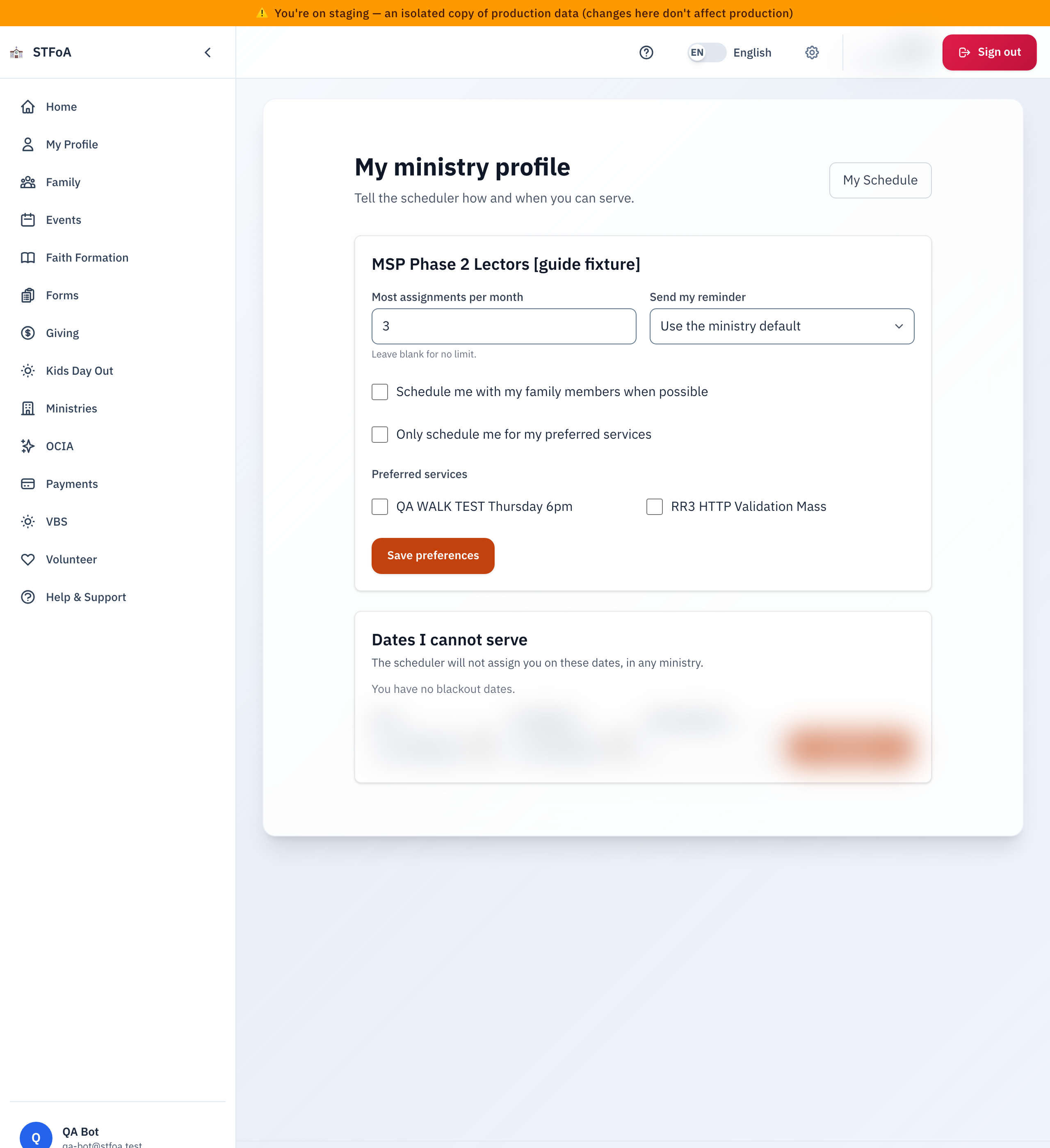
Your reminder time applies to you only. The ministry default stays the same for everyone else.
2. Add dates you cannot serve
Dates I cannot serve applies to every ministry.
- Under Dates I cannot serve, choose From. Choose To if the dates run over more than one day.
- Add a short note if you want one. Only you and the scheduler see it.
- Select Add dates.
- To remove a range, select Remove next to it.
The scheduler does not assign you on these dates. It also blocks a cover request or a trade that would put you on one of them.
If your leader set a blackout, you cannot remove it here. Ask your leader.
3. Take an open position
Your ministry leader builds the schedule. Positions the leader left open show on the opportunity page.
- Open Volunteer, then open your ministry opportunity.
- Find the Open positions list.
- Select Take this position, then confirm.
- Look for the green message You are signed up. It is on My Schedule.
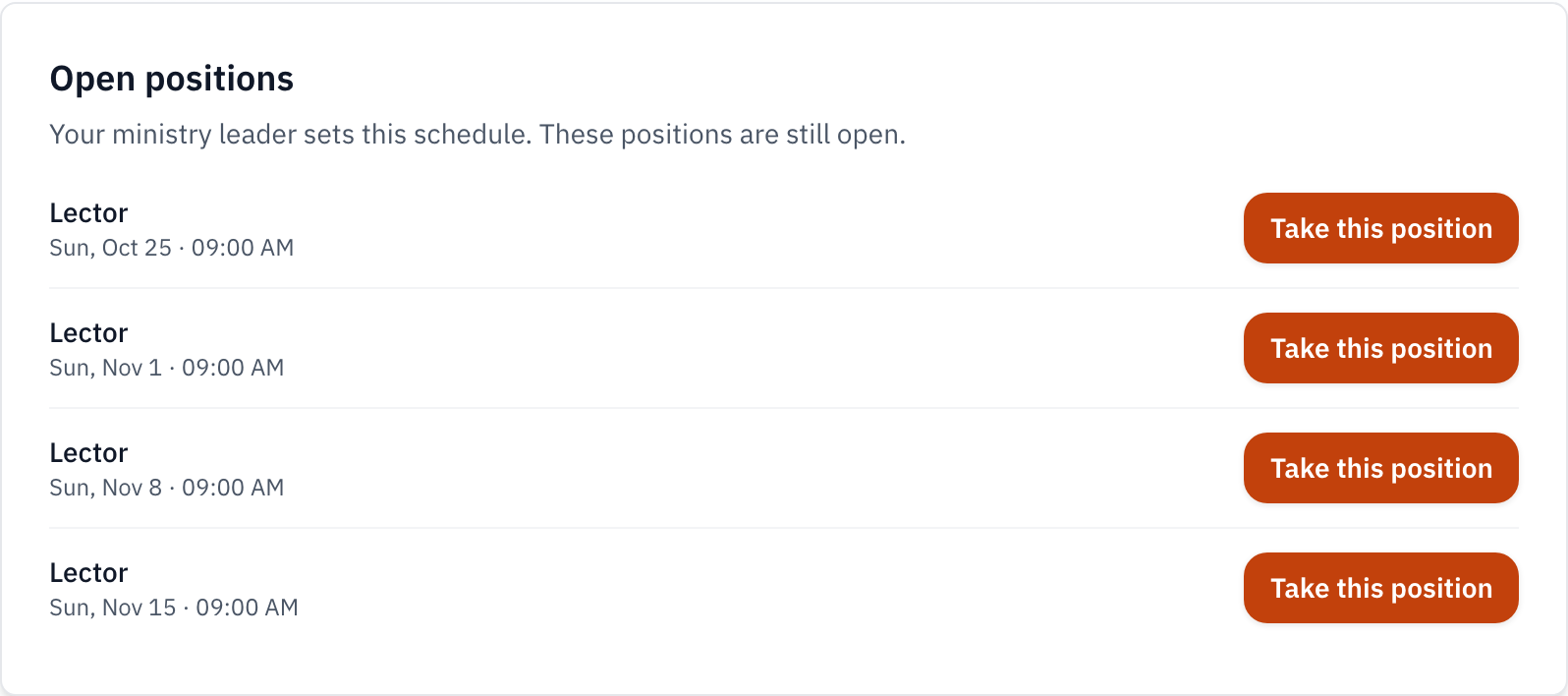
A position is greyed out when you cannot take it. The line under it says why, for example You marked this date as unavailable.
4. Ask one person to cover or trade
Use Ask someone on My Schedule when you cannot serve a confirmed shift.
- Open Volunteer, then My Schedule.
- On the shift card, select Ask someone.
- Choose Someone to take my shift, or To trade shifts with someone.
- Choose the person. The list shows members of your ministry who can serve that date.
- Select Send request.
The person gets an email, and a text message if the parish has their number. The shift stays yours until they accept. While you wait, the card shows Filler Requested, and Shift requests shows Waiting on the person. Select Withdraw to take the request back.
If someone asks you
Shift requests appears at the top of My Schedule.
- For a cover request, select Accept or Decline.
- For a trade, choose one of your own shifts in the same ministry under Your shift to give in exchange. Then select Accept.
- You can also answer a cover request by text. Reply YES to accept or NO to decline. A trade needs the app, because you must choose a shift.
When you accept, the shift moves to you and leaves the other person. A trade swaps both shifts at the same time, or neither.
5. Quick reference card
- Set your limits once in My ministry profile.
- Add every date you cannot serve.
- Take open positions from the opportunity page.
- Use Ask someone for one named person. Use Request Filler to ask everyone.
When to stop and ask
- The page says you are not in a scheduled ministry.
- A request shows an error that says you are not qualified.
- You need to change a blackout your leader set.
Your ministry leader adds you to the ministry and sets who is qualified.