Upgrading Your Guest Account to a Parishioner Account
St. Francis of Assisi Catholic Church · Guest RegistrationWhat each field on the guest upgrade form does, why the parish asks for it, and what happens once you submit.
You have a guest account with the parish — maybe from Vacation Bible School or another one-time sign-up — and you want to register your whole family as parishioners so you can use everything the parish offers, like Faith Formation.
A guest account only holds your name and contact details. It has no date of birth, no gender, and no home address, so it cannot become a full parishioner record on its own — and Faith Formation and other parish programs need those details before your family can enroll. This form asks for exactly what is missing and nothing you have already given us.
What you will do, in one sentence
Add your date of birth, gender, home address, and your children's details, then submit to turn your guest account into a full parishioner account.
Last verified against the staging system on 2026-10-20. Screens shown are the staging system (an isolated copy of production). The account and children shown belong to a dedicated test account, not real parishioners. Prepared 20 October 2026.
1. Why you're seeing this form
A guest account lets you sign up for a one-time thing — like Vacation Bible School — without going through full parish registration. It gives you a sign-in, but it holds only your name and your contact details.
Some parts of the parish, like Faith Formation, need more than that: they need a real parishioner record for you and your family. When you try to reach one of those from a guest account, the parish shows you a Register as a parishioner button. That button brought you here.
This form does not start you over. It keeps the account you already have and asks only for the pieces a parishioner record needs that a guest account does not carry.
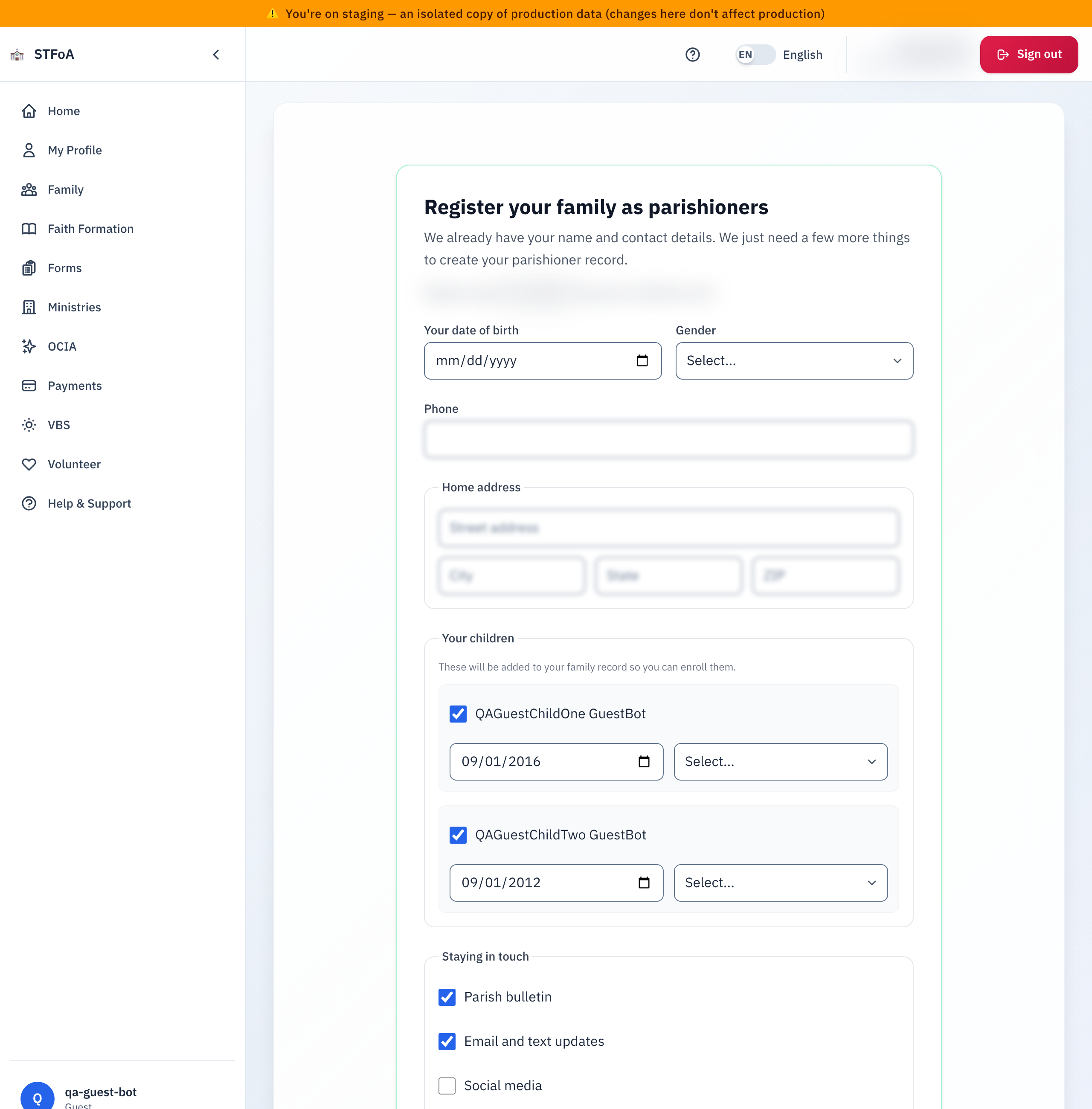
Near the top of the form, you will see a line that starts with Registering as and shows your name and email address. This confirms whose account you are upgrading. You do not need to type either one again.
While the form loads your existing details, you will see a loading spinner. If your details fail to load, the form shows a message asking you to refresh and try again — nothing is lost, and you have not been charged or signed up for anything at this point.
2. Filling in what we don't have yet
Two boxes on this form are always empty when the page opens, because a guest account does not carry them:
- Your date of birth — pick the date. This box is required.
- Gender — choose from the list. This box is required.
One more box usually opens with an answer already in it, because the parish already has it on file. Check it, and correct it if it is wrong:
- Phone — required either way, even if the parish has none on file yet.
Below that, the Home address section asks for your street address, city, state, and ZIP. Faith Formation cannot enroll a family with no address on file, so all four boxes are required. If the parish already has an address for you, all four start filled in — check them, and correct anything that has changed.
3. Adding your children and choosing how we contact you
Your children
If you have children linked to your guest account, a Your children section lists them. If you have none linked, this section does not appear at all — skip ahead to Staying in touch.
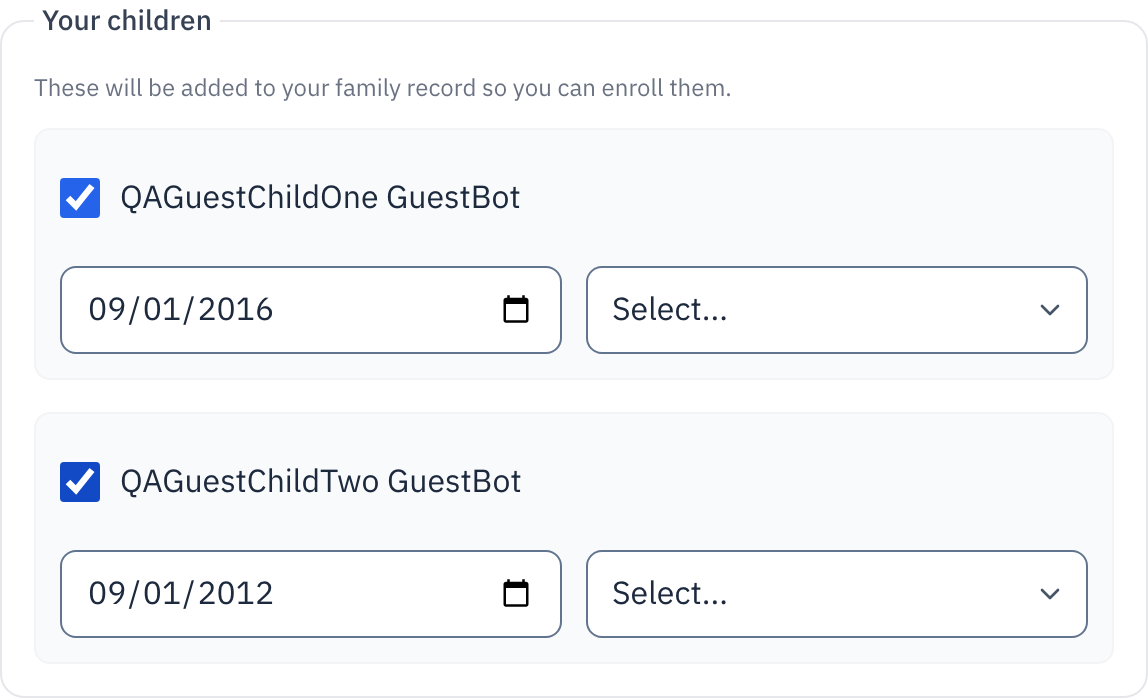
Each child starts checked, because we assume you want to bring them with you when you register as a parishioner:
- Leave a child checked to add them to your family record now, so you can enroll them later.
- Uncheck a child to leave them out of this submission. Nothing happens to them — they simply are not added as part of this upgrade.
- For every child you leave checked, pick their gender. This box is always empty, even when the parish already has other details about that child.
- Their date of birth box often starts filled in from what the parish already has. Check it, and correct it if it is wrong.
You cannot submit the form with a child checked but their date of birth or gender left blank. Uncheck the child instead if you are not ready to add them yet.
Staying in touch
The Staying in touch section lists ways the parish can reach you. Five start checked, and one starts unchecked:
| Choice | Starts |
|---|---|
| Parish bulletin | Checked |
| Email and text updates | Checked |
| Social media | Unchecked |
| Texas Catholic magazine | Unchecked |
| Parish announcements by email | Checked |
| Parish announcements by text | Unchecked |
The form shows this notice next to the box: checking it gives your express consent to receive text messages from the parish, and message and data rates may apply. Leave it unchecked if you do not want texts.
These are the same choices covered in the Choosing How the Parish Contacts You guide, and you can change any of them later from your account. A link to the parish's privacy policy sits at the bottom of this section.
Messages about a program you or your family joins — like Faith Formation or Vacation Bible School — go out regardless of these choices. You control those separately, once you are enrolled.
4. What happens after you submit
Select Complete registration at the bottom of the form. While the parish creates your record, the button changes to Registering... and cannot be selected again. Select Cancel instead at any point to leave without changing anything.
Once your record is created, you are taken straight to the Faith Formation page — there is no separate confirmation screen. Your account is now a parishioner account.
Once you submit, your account changes from a guest account to a parishioner account. If you visit this page again afterward, the parish sends you away automatically, because this page is only for guest accounts. If you notice a mistake in what you entered, contact the parish office — do not try to submit the form a second time to correct it.
Two things can stop the submission instead:
- A field needs attention. A short red list appears above the buttons naming which box to fix. Fix it and select Complete registration again.
- A parishioner record already exists for your email or phone. The form tells you this and asks you to contact the parish office, so they can connect your existing account instead of creating a second one.
If you see a general error message rather than one of the two above, it is safe to select Complete registration again. Retrying will not create a duplicate record.
5. Quick reference card
The whole thing, in four lines
- Fill in your date of birth, gender, and phone, and confirm your home address.
- For each child you want to bring with you, keep them checked and fill in their date of birth and gender.
- Choose how the parish contacts you, then select Complete registration.
- You land on the Faith Formation page — your account is now a parishioner account.
When to stop and ask
- The form tells you a parishioner record already exists for your email or phone.
- You submitted and notice a mistake afterward — this page will not let you back in to fix it.
- A child you expected to see is missing from the Your children section.
Parish office — contact them for any of these. They can connect an existing record or fix what you entered.
Two rules
- Check the text-message box only if you want texts from the parish — it is never checked for you.
- Uncheck a child instead of leaving their date of birth or gender blank.
Thank you for becoming a parishioner. Once you are enrolled, Faith Formation and everything else the parish offers is open to your whole family.